Article Content
Overview
The attachments field allows users to upload files, URLs (web links), or both to an object. Most standard file types are accepted by this field; however, there are some file restrictions.
Note:
Files that contain the word compressed cannot be uploaded.
If a supported document file is uploaded to this field, it's possible to search for those documents by keywords in the file name and/or contents or by upload date. See the Attachment Searches article for more details.
Attachments Field
When the File only or File and web link option is selected in the field's settings, users can upload files (up to 100 MB in size) or web links by clicking the file or web link upload area on a form (as shown in the screenshot above).
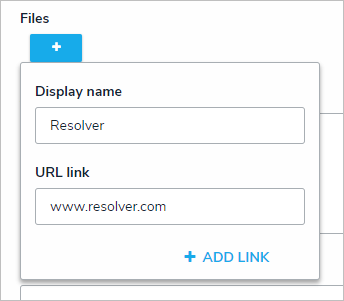
If the Web link only option is selected, users can upload a link by clicking the  icon (as shown in the screenshot below). If the optional display name for the web link is not included, the full URL will be displayed. Clicking the link will open the site in a new tab in your browser.
File Restrictions
| .ade | .com | .inf | .maf | .mda | .msh2 | .prf | .scf | .vsmacros |
| .adp | .cpl | .ins | .mag | .mdb | .msh2xml | .prg | .scr | .ws |
| .app | .crt | .isp | .mam | .mde | .mshxml | .ps1 | .sct | .wsc |
| .asp | .csh | .its | .maq | .mdt | .msi | .ps1xml | .shb | .wsf |
| .as | .der | .jar | .mar | .mdw | .msp | .ps2 | .shs | .wsh |
| .bas | .exe | .js | .mas | .mdz | .mst | .ps2xml | .tmp | .xnk |
| .bat | .fxp | .jse | .mat | .msc | .ops | .psc1 | .url | |
| .cer | .gadget | .ksh | .mau | .msh | .pcd | .psc2 | .vb | |
| .chm | .hlp | .lnk | .mav | .msh1 | .pif | .pst | .vbe | |
| .cmd | .hta | .mad | .maw | .msh1xml | .plg | .reg | .vbs |